Checking narration…
On this page
You finished recording. Now a different kind of problem begins: file formats, loudness numbers and upload errors. This guide walks through what each platform asks for, why files get rejected, and a simple workflow for getting from raw recordings to something you can upload.
Which file format does each platform want?
It depends on where you're publishing. There isn't one "audiobook file".
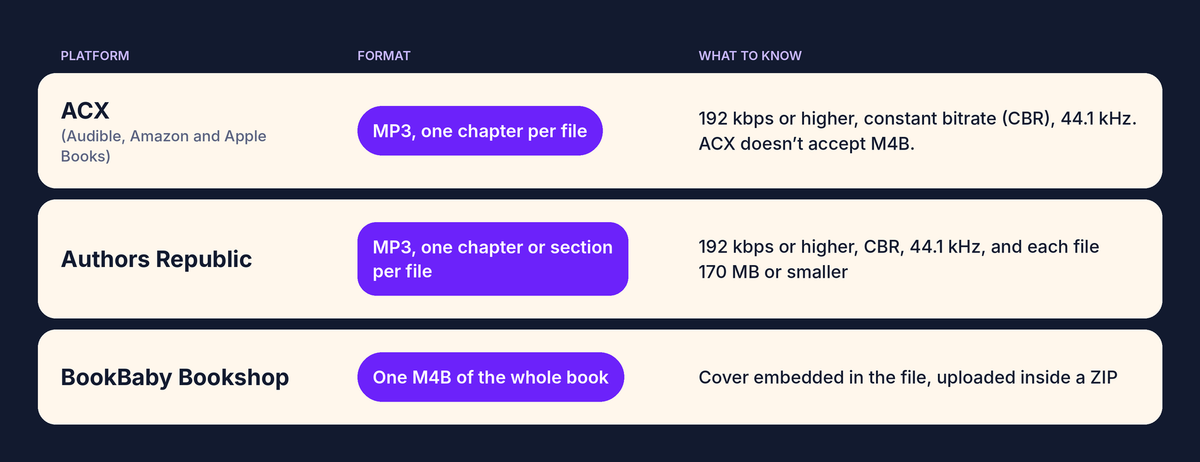
The levels are the same across all three: RMS between −23 and −18 dB, peaks no higher than −3 dB, and a noise floor of −60 dB or lower.
What is an M4B, and do you need one?
M4B is a standard audiobook file type. Unlike MP3, it lets listeners bookmark their spot. BookBaby notes that M4B is primarily an Apple format, but PC and Android users can play it with free software. BookBaby Bookshop takes the whole book as one M4B.
You can't upload an M4B to ACX, which requires MP3. So the format you need depends on the route you choose. If you're selling through ACX, you need MP3 chapters. If you're selling direct or through a store like BookBaby Bookshop, you need an M4B.
Why do audiobook files get rejected?
Most rejections trace back to a short list of technical requirements. ACX checks your files against these:
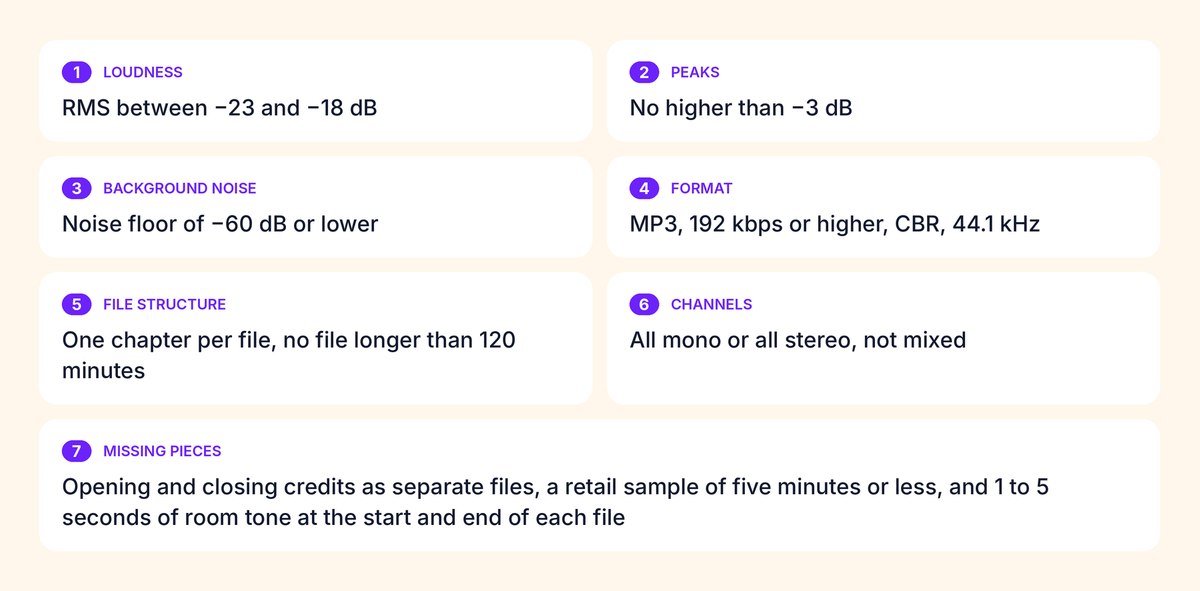
These are technical checks. Meeting them is required for approval, but no tool can promise your audiobook will be approved.
What's a simple workflow for getting files ready?
- Decide where it's going. ACX needs MP3 chapters. BookBaby Bookshop needs one M4B. Knowing this first saves rework.
- Record and edit in WAV. Keep your edits in an uncompressed format. Every MP3 export compresses the audio again, so export once, at the end.
- Split by chapter and name files in order. One chapter per file, named so they sort correctly (01, 02, 03, and so on).
- Add the extras. Room tone at the start and end (ACX recommends 1 to 5 seconds), opening and closing credits as separate files, and a retail sample of five minutes or less.
- Check your levels. Measure RMS, peaks, and noise floor, and fix anything outside the specs.
- Export once, at the end. For ACX, export MP3 at 192 kbps or higher, CBR, 44.1 kHz. For direct sales or BookBaby, bind one M4B with your embedded cover.
- Listen through before you upload. Check chapter order, the start and end of each file, and any places where levels jump.
Steps 5 to 7 are the fiddliest, and a tool can help.
Where does Audibound Converter/Binder fit?
Audibound Converter/Binder is a Mac app built for this last mile. Drop in your chapter files, in any mix of formats, and it sorts them into order, pulls in titles and metadata, reduces background hiss and hum, and checks and fixes your levels against ACX's loudness, peak and noise-floor specs. Then it compiles everything into a single, DRM-free audiobook file with chapters and your cover art, as an M4B or an MP3, ready for direct sales and review copies. Everything runs on your Mac, so your unreleased recordings never leave your computer. A Windows version is on the way, and the waitlist is open.
ACX requires one MP3 per chapter, so check your files against its specs before you upload.
Ready to get your files in shape? Try Audibound Converter/Binder, a Mac app that checks your levels and compiles your recordings into a chapterized, DRM-free audiobook file.
Once your files are live, Marketing Your Audiobook After Launch covers promo codes, Chirp deals and your reader list.
Sources
- ACX: Audio submission requirements, April 15, 2026
- ACX: Choose a distribution option, October 21, 2026
- Authors Republic: Meeting audio requirements
- BookBaby: What's an M4B file?
- BookBaby: How do I supply the audio content for my audiobook
- Audibound Converter/Binder